Shopify Integration Upgrade to GraphQL in Linnworks
Scenario
Linnworks is upgrading the Shopify integration from Shopify's REST API to their modern GraphQL API. This upgrade improves performance, adds new features, and aligns with Shopify's long-term API direction.
If you have an existing Shopify integration in Linnworks, you will need to upgrade each integration individually. New Shopify integrations are automatically set up on the GraphQL version.
This article explains what's changing, how to upgrade, and what actions (if any) you need to take.
Solution
- What is the Shopify GraphQL upgrade?
- How to upgrade your Shopify integration
- New features and capabilities
- New configuration options
- Action required: POS (EPOS) customers
- Changes to order reference IDs and XML
- Frequently Asked Questions
- Additional information
1. What is the Shopify GraphQL upgrade?
Shopify is moving to GraphQL as their primary API platform. This upgrade transitions your Linnworks Shopify integration from the older REST API to GraphQL, unlocking new capabilities and improving performance.
What's new
- Multi-fulfillment support (split shipping, multi-carrier, multi-location)
- Presentment currency (orders in the buyer's payment currency)
- Improved POS order handling
- Approximately 5x faster order downloads
- Tax and duties improvements (Avalara support, duties as service items, resident IDs)
What's NOT changing
- Order data in Linnworks looks the same (apart from the reference ID format — see section 6)
- Order statuses are unchanged (processed = processed, paid = paid, etc.)
- Order relationships for split orders still work the same way
- All existing download settings (download on hold, download processed, etc.) remain in the same places and work the same way
- No re-authentication required — you do not need to reconnect your Shopify store
- Inventory sync and stock levels are unchanged — this upgrade only affects the order side
- No action required for the majority of customers
2. How to upgrade your Shopify integration
- Go to Settings > Channel Integration in Linnworks.
- Open the configuration for your Shopify integration.
- Click the “Upgrade Integration” button.
[SCREENSHOT: “Upgrade Integration” button in the Shopify integration config modal]
After clicking, the integration switches to the GraphQL version and new configuration options appear (see section 4).
Important notes:
- The upgrade is per-integration. If you have multiple Shopify stores connected to Linnworks, you need to upgrade each one individually.
- No re-authentication is required. Your existing Shopify connection stays active.
- Only new orders downloaded after the upgrade use the new format. Existing orders in Linnworks are not affected.
3. New features and capabilities
Multi-fulfillment support
Orders with multiple fulfillments are now fully supported. This covers:
- Split shipping — different items in the same order shipped to different addresses
- Multiple carriers — different shipping services for different parts of the order
- Multi-location fulfillment — items fulfilled from different warehouse locations
- Mixed delivery — e.g., some items picked up in store (POS) and others delivered
Each fulfillment order from Shopify is saved as its own order in Linnworks, mirroring Shopify's fulfillment structure. Orders with only one fulfillment (most orders) look and behave the same as before. Related fulfillment orders are linked via an order relationship, so they remain traceable.
Presentment currency
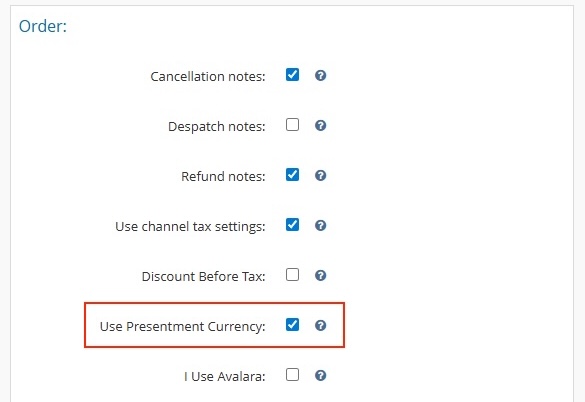
You can now download orders in the buyer's payment currency (presentment currency) instead of your shop's base currency. This is useful if you sell internationally and want orders in Linnworks to reflect what the buyer actually paid. See section 4 for how to enable this.
Improved POS order handling
POS (Point of Sale / EPOS) order handling has been overhauled:
- Mixed POS orders are handled properly — e.g., items bought in store but delivered later are tracked separately as individual fulfillments.
- A new config option gives you granular control over stock deduction for fulfilled POS orders.
- POS orders follow the same fulfillment-based logic as all other orders.
If you use Shopify POS, there are required changes to your settings. See section 5 for full detailsFaster order downloads
The GraphQL integration delivers approximately 5x faster order download times compared to the REST integration. This benefits all customers but is most noticeable for merchants with large order volumes or frequent flash sales.
Tax and duties improvements
- Avalara support — A new config option for merchants using Avalara's Shopify plugin for US multi-tax-rate calculations. See section 4.
- Duties now download as a Service Item in Linnworks.
- Resident IDs(Tax IDs, Shipping Credentials) now save as Order Extended Properties:
BUYER_TAXIDfor buyer tax identificationSHIPPING_CREDENTIALfor shipping credentials- See Shopify's LocalizedFieldKey reference for the full list.
4. New configuration options
Three new settings are added to the Shopify integration configuration after you upgrade.
| Setting | What it does | Default |
|---|---|---|
| Use Presentment Currency | Download orders in the buyer's payment currency instead of your shop's base currency | Off |
| Deduct Stock for Fulfilled POS Orders | Controls whether stock is deducted when fulfilled POS orders are processed (replaces the old “Process POS orders” setting) | Off |
| Uses Avalara for Tax Calculations | Adapts tax calculation for merchants using Avalara's Shopify plugin | Off |
Each option has a tooltip — hover over the ? icon next to each setting for a full description.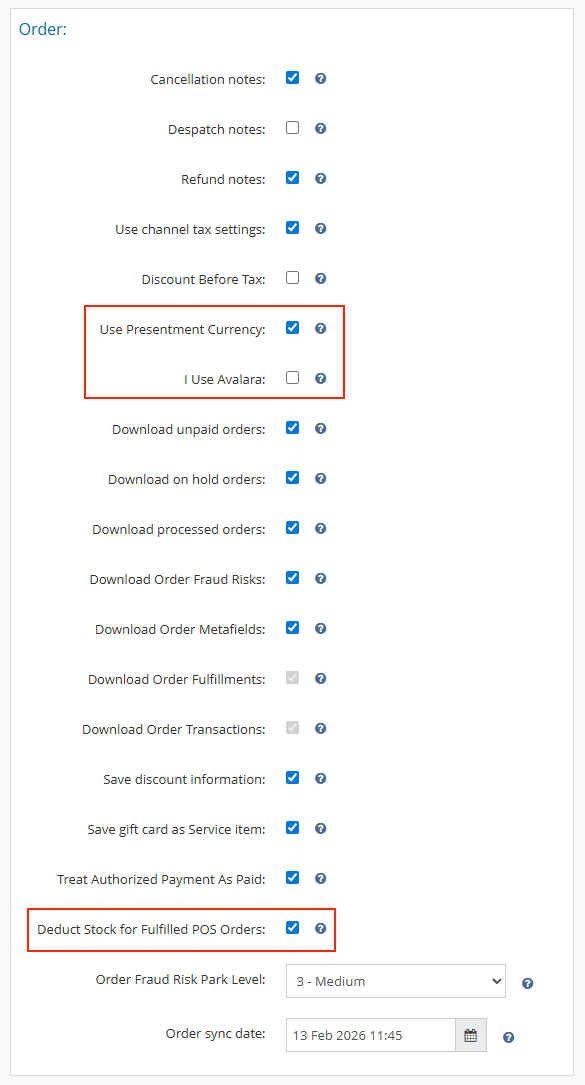
5. Action required: POS (EPOS) customers
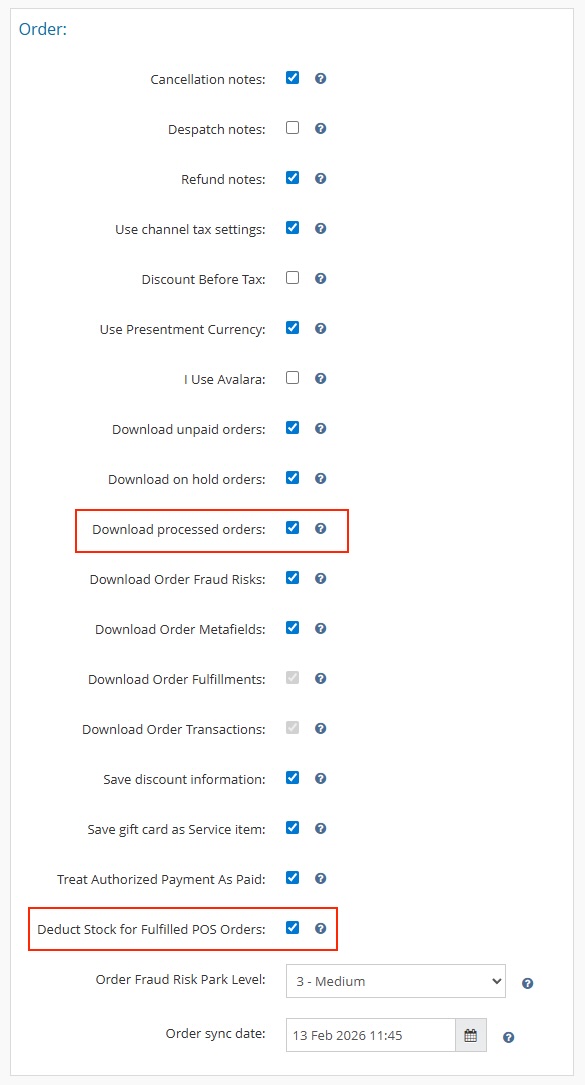
If you use Shopify POS, your settings need to be updated after upgrading. The old “Process POS orders” toggle has been replaced with new, more flexible options.
What changed
| Before (REST) | After (GraphQL) |
|---|---|
| A “Process POS orders” toggle controlled whether POS orders were auto-processed | “Process POS orders” is replaced by “Deduct Stock for Fulfilled POS Orders”. POS orders must be marked as fulfilled on Shopify to be processed in Linnworks. “Download processed orders” must be enabled for fulfilled POS orders to appear. Unfulfilled POS orders will still download but will not auto-process. |
How it works
| Scenario | What happens |
|---|---|
| POS order fulfilled on Shopify, “Download processed orders” ON, “Deduct Stock” ON | Order downloads and processes with stock deduction |
| POS order fulfilled on Shopify, “Download processed orders” ON, “Deduct Stock” OFF | Order downloads and processes without stock deduction |
| POS order fulfilled on Shopify, “Download processed orders” OFF | Order does not download |
| POS order NOT fulfilled on Shopify | Order downloads but does not auto-process |
What you need to do
- Enable “Download processed orders” in your Shopify integration settings (if not already enabled).
- Ensure your POS orders are marked as fulfilled on Shopify. See Shopify's guide on fulfilling POS orders for instructions.
- Review the “Deduct Stock for Fulfilled POS Orders” setting and enable it if you want stock levels to update when fulfilled POS orders are processed.
6. Changes to order reference IDs and XML
Reference ID format change
- Before:
{ShopifyOrderId} - After:
{ShopifyOrderId}-{FulfillmentOrderId}
Because Linnworks now saves each fulfillment order as its own order, the reference ID includes both parts to uniquely identify each fulfillment.
Order XML format change
The raw order XML stored in Linnworks has changed because the data now comes from Shopify's GraphQL API instead of REST.
Key differences:
- Field names change from PascalCase (e.g.,
LineItems) to camelCase (e.g.,lineItems) - Some fields have been renamed (e.g., custom attributes are now under
customAttributeswithinlineItem, withkeyandvalueinside) - Some fields may have moved or are no longer present
- Many fields will appear blank because GraphQL only requests the specific data needed
The full Shopify order data is still included on each fulfillment order, so all data remains accessible.
Who is affected
These changes affect you if you have:
- Custom macros or extensions that reference the Shopify order reference ID
- XMLExtractor configurations that reference Shopify XML fields
- XML Dispatch Date macros for Shopify
- Rules Engine scripts that parse Shopify order XML
What to do
Update your configuration parameters to match the new field names and casing. For example, if your XMLExtractor config references LineItems, update it to lineItems.
If you have a customization that was built by Linnworks, contact Linnworks support so we can update it for you.
7. Frequently Asked Questions
Do I need to re-authenticate my Shopify connection?
No. The upgrade is seamless. No re-authentication or reconnection is required.
Will my existing orders in Linnworks be affected?
No. Only new orders downloaded after the upgrade use the new format. Existing orders remain unchanged.
Can I go back to the old REST version if needed?
Yes. Contact Linnworks support if you need to revert to the previous version of the integration.
How do I know if I'm on the new GraphQL version?
If you can see the new config options (Use Presentment Currency, Deduct Stock for Fulfilled POS Orders, Uses Avalara for Tax Calculations) in your Shopify integration settings, you are on the GraphQL version.
My macro or extension stopped working after the upgrade. What should I do?
This is likely due to the order XML format change. Field names have changed from PascalCase to camelCase, and some fields have moved. Review your macro or extension configuration and update the field references to match the new format. See section 6 for details. If you have a customization that was built by Linnworks, contact support so we can update it for you.
My POS orders stopped auto-processing. What happened?
POS order handling has changed with the upgrade. You need to:
- Ensure your POS orders are marked as fulfilled on Shopify.
- Enable “Download processed orders” in your Shopify integration settings.
- Review the “Deduct Stock for Fulfilled POS Orders” setting.
See section 5 for full details.
How does presentment currency work?
After upgrading, enable “Use Presentment Currency” in your Shopify integration settings. Orders will then download in whatever currency the buyer paid at checkout, rather than your shop's base currency. This is a per-integration setting.
Does this upgrade affect inventory sync or stock levels?
No. The upgrade only affects order download, refunds, and cancellations. Inventory sync and stock level management are unchanged.